Culling 1,668 Photos from Montenegro
The full culling workflow from 1,668 RAW images down to 467 intentional keeps. AI-assisted first pass, manual review, burst trimming, star ratings, and purpose-based collections.
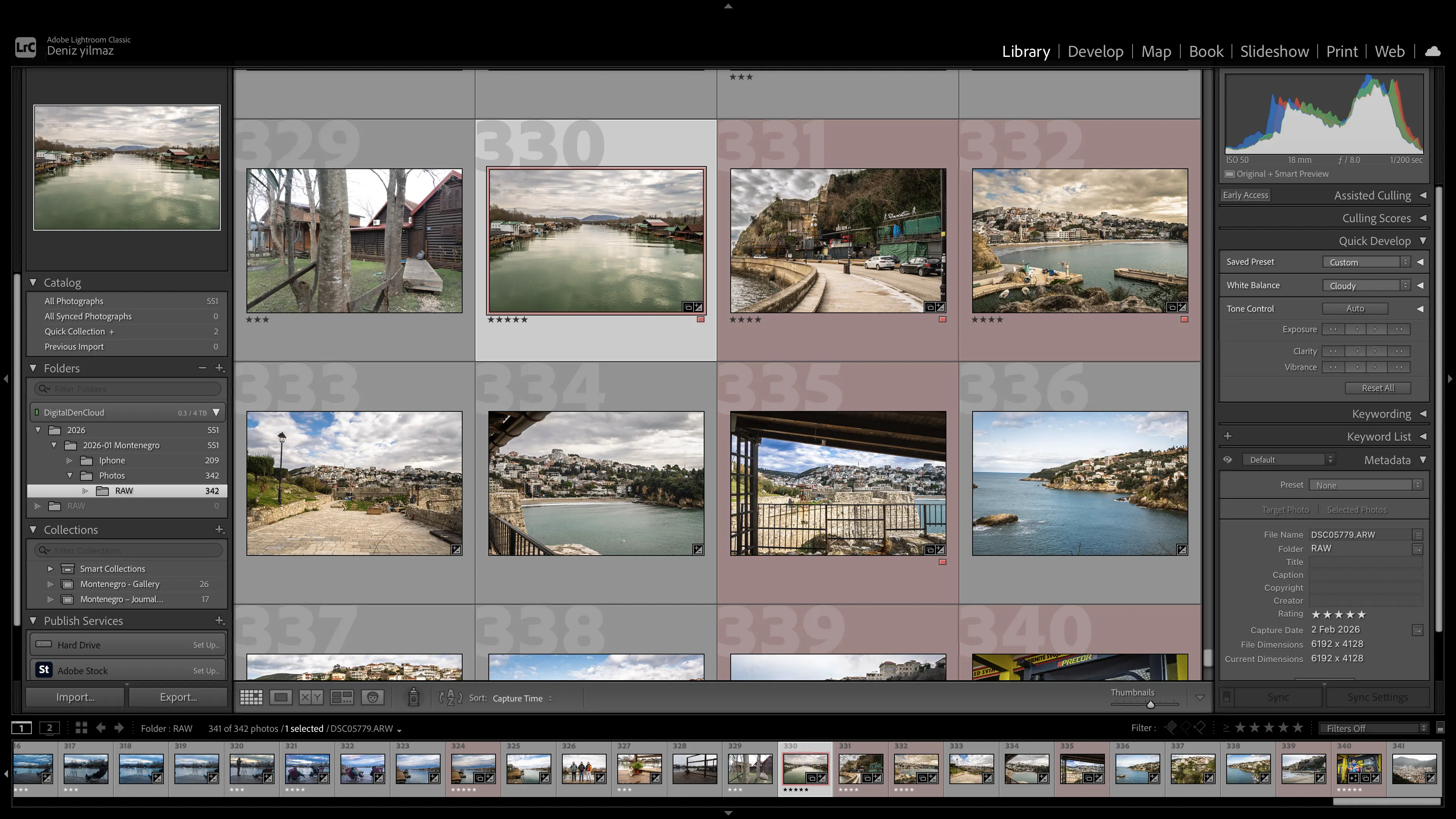
When I got back from Montenegro, I had 1,668 images. All RAW from the Sony A6700, stored on my external NVMe SSD inside Capture_Archive → 2026 → 2026-01 Montenegro → Photo → RAW.
Before doing anything else, I created a brand new Lightroom Classic catalog called DigitalDenCloud_Lightroom_Catalog.
That was intentional. Not a “Montenegro catalog”. A scalable, long-term catalog for everything going forward. One master system, not scattered projects.
What this post covers
The complete culling process from 1,668 RAW imports down to 467 keeps. AI-assisted culling, manual review, burst trimming, star ratings, and purpose-based collections. This is process documentation, not a Lightroom tutorial.
Step 1: Import
The RAW files were already on my external drive, so during import I chose Add, not Copy. I did not want Lightroom duplicating files or moving anything. The folder structure is my archival truth. Lightroom is just the database layer.
I enabled Smart Previews during import. If I am on a plane or somewhere without the drive plugged in, I still want to be able to review and edit. That is future-proofing, not just convenience.
After import, all 1,668 were visible in Lightroom.
That is when the real work started.
Step 2: AI-Assisted Culling
Lightroom’s AI Assisted Culling offers several criteria: subject focus, eye focus, eyes open, exposure misfires, and auto stacking.
Most of my trip was landscapes. Some portraits. Gym footage. Burst sequences of wood chopping.
I enabled Subject Focus first.
Result: 429 rejects.
That felt extreme.
Then the confusion started. Lightroom was flagging many landscapes as “subject appears to be out of focus.” In a scenic shot, there is not always a defined subject. The AI expects something like a person or a focal anchor. Fog, depth, layered mountains, the AI struggles with that.
I had to pause and ask: is this actually blurry, or is the AI just strict?
That was an important lesson. AI is a filter. Not authority.
Flags Confusion
I started pressing X to reject and U to unflag, but the red X was not disappearing.
It took me a moment to realise I was still inside Assisted Culling mode. The interface state matters. Once I exited Assisted Culling and went back to normal Library view, flags behaved as expected.
That small misunderstanding could have led to deleting things blindly.
Mode awareness
Always confirm whether you are inside Assisted Culling or standard Library view before flagging or unflagging. The interface looks similar but behaves differently.
Step 3: Manual Review of Rejects
Instead of deleting 429 files in one go, I filtered by Rejects and went through them manually in Grid view.
For anything worth keeping, I pressed U to unflag.
The reject count came down gradually: 429, then 226, then 119. Controlled pruning, not panic deletion.
Step 4: Second AI Pass
After stabilising, I ran Assisted Culling again with stricter criteria: subject focus, eye focus, and organise results.
This time it removed genuinely soft portrait frames and weak expressions.
Then the numbers started behaving strangely.
I saw 559. Then 669. Then 1,411 on disk. Then 998 after expanding stacks.
I thought I had lost files.
I had not.
Stacking was involved.
Step 5: Burst Trimming with Stacks
Some thumbnails showed numbers like 2, 5, 6 in the corner. Pressing S expanded them.
Auto Stack had grouped burst sequences. The wood chopping alone had 20 to 50 frames per swing.
Stacks are not deletes. They are grouping mechanisms. Once expanded, I went inside each stack, kept the strongest frame, and pressed X on the rest. Collapsed again.
That dramatically reduced visual clutter. Eventually I was down to 596, then more trimming brought it to 467.
Stacking behaviour
Collapsed stacks hide images from the visible count. If your numbers suddenly drop, expand all stacks before assuming anything is missing.
Once I had selected the best frame from every burst, I unstacked everything. I do not like leaving stacks in a final archive. It hides clarity. I want to see everything plainly.
Step 6: Star Ratings
Only after structural deletion did I move to rating.
I asked myself: do I rate everything? Do I only use 5 stars? Should I check the histogram while culling?
I decided the histogram is not for culling. Culling is about potential. Exposure can be fixed. Composition and emotion cannot.
My system:
| Rating | Meaning |
|---|---|
| 3 stars | Solid archive |
| 4 stars | Strong |
| 5 stars | Hero |
I do not use 1 or 2 stars. That adds noise.
Final distribution:
| Rating | Count |
|---|---|
| 3 stars | 108 |
| 4 stars | 38 |
| 5 stars | 28 |
| Total kept | 467 |
Step 7: Purpose-Based Collections
Then I created purpose collections:
| Collection | Count | Purpose |
|---|---|---|
| Montenegro, Journal Post | 18 | Images that support narrative |
| Montenegro, Gallery | 37 | Images that stand alone visually |
| Archive (remaining) | 412 | Memory and future resource |
Journal images support narrative. Gallery images stand alone. Archive images are memory and future resource.
I also added a few iPhone JPEGs for story context. I created a folder next to RAW and imported using Add. Those support narrative, not portfolio quality.
Why 40 to 50 Max in a Gallery
I set this limit deliberately. Attention drops. Repetition weakens impact. Strong images get diluted by similar frames. 37 felt tight and disciplined.
The Emotional Part
There was a moment where I saw numbers shift unexpectedly and thought something catastrophic had happened. 559. Then 669. Then 1,411 on disk. Then 998 after expanding stacks.
That panic is real. Lightroom is logical, but visually confusing. Once I understood stacking and filters, everything made sense.
No irreversible mistakes were made.
What I Learned
AI helps but must be questioned. Landscapes require human judgement because the AI expects a defined subject, and scenic depth does not give it one.
Stacks are powerful but confusing if misunderstood. The visible count changes when stacks collapse, and that can look like data loss when it is not.
Delete in layers, not in one sweep. I went from 1,668 to 467 across multiple passes, each one more deliberate than the last.
Do not edit before structural clarity. Rating and colour work come after the archive is clean, not before.
Purpose defines selection. A gallery image and a journal image serve different functions. Separating them early keeps decisions sharp.
And most importantly: culling is not just removal. It is decision making.
Quick Reference
A summary to come back to next time.
Culling Workflow
| Step | Action | Output |
|---|---|---|
| 1. Import | Add (not Copy), enable Smart Previews | All RAW files in catalog |
| 2. AI-Assisted Culling | Subject focus on portraits only, skip landscapes | First round of rejects flagged |
| 3. Manual Review | Filter by rejects, unflag keepers in Grid view | Reject count reduced |
| 4. Second AI Pass | Stricter criteria, eye focus, organise results | Weak frames removed |
| 5. Burst Trimming | Expand stacks, keep best frame, reject rest, then unstack all | Visual clutter cleared |
| 6. Star Ratings | 3 = archive, 4 = strong, 5 = hero, skip 1 and 2 | Rated archive |
| 7. Purpose Collections | Journal (narrative), Gallery (standalone), Archive (rest) | Final structure |
Star Rating System
| Rating | Meaning | Use |
|---|---|---|
| 1-2 stars | Not used | Adds noise |
| 3 stars | Solid archive | Worth keeping, not showcasing |
| 4 stars | Strong | Shortlist for use |
| 5 stars | Hero | Best of the batch |
Key Principles
| Principle | Reason |
|---|---|
| AI is a filter, not authority | Landscapes get false rejects |
| Delete in layers | Multiple passes prevent reckless removal |
| Histogram is not for culling | Exposure can be fixed, composition cannot |
| Unstack when finished | Stacks hide clarity in a final archive |
| 40 to 50 max in a gallery | Attention drops, repetition weakens impact |
| Do not edit before culling | Structural clarity first, colour work after |
What I Will Do Differently
Next time I come back with a large batch, I am changing a few things.
- Shoot more intentionally at capture
- 1,668 RAW files across one week is roughly 238 per day. A lot of that was burst sequences, and the wood chopping alone produced 20 to 50 frames per swing. Most of those were always going to be rejects. For future trips, I will be more selective with bursts. Five to ten frames gives me the same pick as thirty. Landscapes do not move, so composing once properly is cheaper than culling duplicates later. I will also review on camera at the end of each day and delete obvious misses there. Blurry frames, accidental fires, duplicates I can already see are weaker. 467 keepers from 1,668 is a 28% keep rate. Getting that closer to 40 or 50% by being more intentional at capture would cut culling time significantly without missing anything worth having.
- Cull before importing
- I will open the RAW folder directly and delete obvious throwaways before Lightroom ever sees them. Accidental shutter fires, completely blown exposures, near-identical burst frames. Less catalog bloat, faster Smart Preview generation, and no initial shock from hundreds of AI rejects.
- Run AI culling selectively
- Subject focus and eye focus make sense for portraits. They do not make sense for fog, depth, and layered mountains. I will separate the two and handle landscapes entirely by eye. That removes the noise from the AI pass.
- Rate during the first manual pass, not after
- This time I did structural deletion first, then came back for star ratings as a separate phase. That meant two full passes through the same images. Next time I will combine them. As I review rejects and bursts, assign 3, 4, or 5 at the same time. One pass, two decisions.
- Pre-build collection structure before culling
- I created the Journal and Gallery collections after the fact, which meant going back through 467 images to sort them. Next time I will set those up beforehand and drag keepers into the right collection during review. Saves an entire pass.
- Establish a stack strategy upfront
- The stacking confusion cost me time and caused that panic moment with the shifting numbers. Before starting, I will decide: auto stack or not. If yes, expand all stacks immediately after the AI pass so the visible count always matches reality. If no, handle bursts manually from the start. No mid-workflow confusion.
The core process, layered reduction, AI as filter not authority, purpose-based collections, that part is solid. These improvements collapse multiple passes into fewer passes and front-load decisions I ended up making anyway.
Documented February 2026.